Implementing Zero Trust Security in Azure
Introduction
Zero Trust is a modern security strategy based on the principle "never trust, always verify." Instead of assuming everything behind the corporate firewall is safe, the Zero Trust model assumes breach and verifies each request as though it originates from an open network.
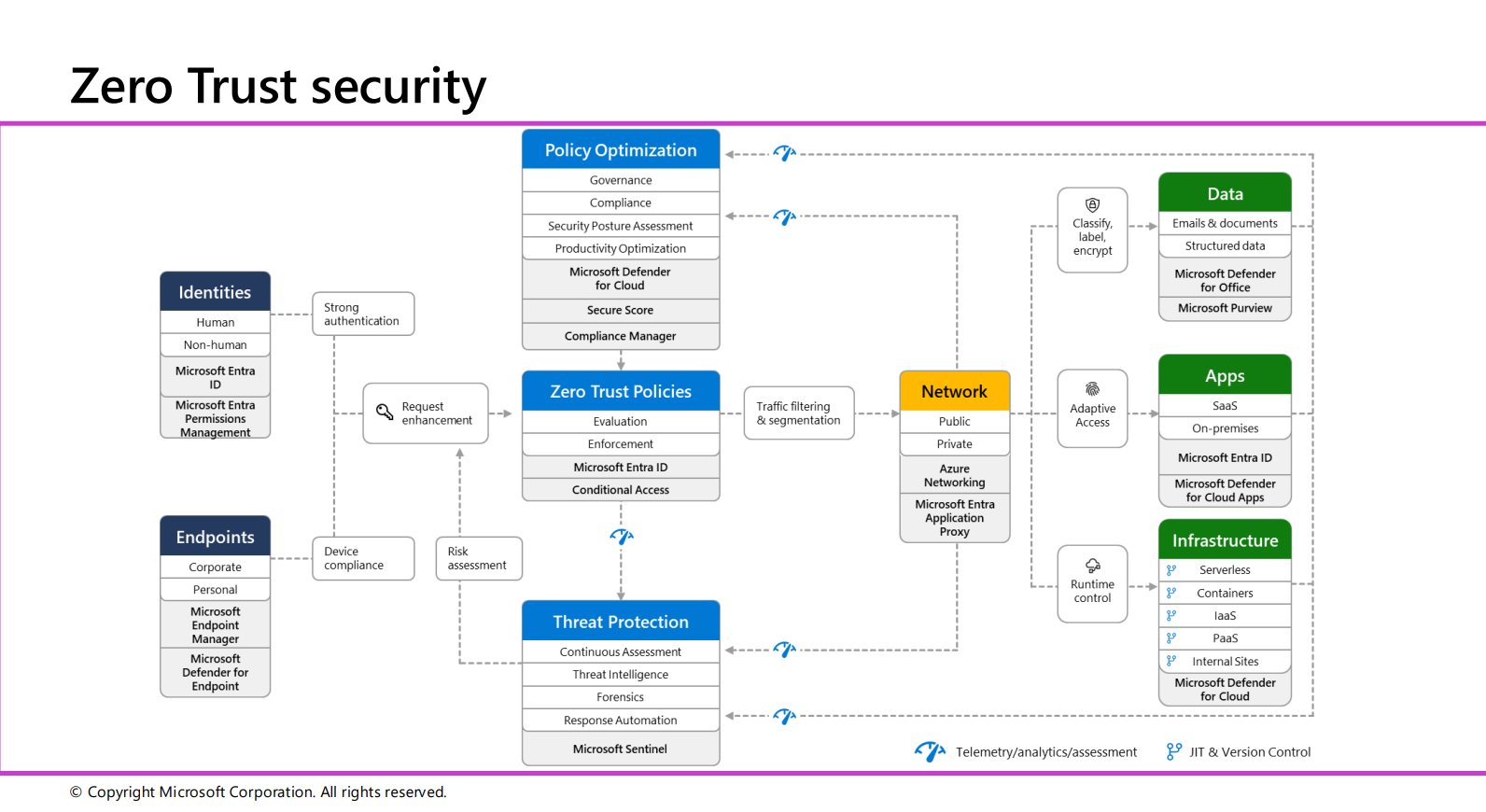 Image credit: Microsoft
Microsoft's Zero Trust Security Framework
Microsoft's Zero Trust Security model is a comprehensive framework designed to protect identities, endpoints, data, applications, and infrastructure through continuous verification, adaptive access controls, and telemetry.
Key Components
-
Identities
- Human and Non-Human Identities: Managed through Microsoft Entra ID and Microsoft Entra Permissions Management
- Strong Authentication: Enforces multi-factor authentication (MFA) and conditional access policies
- Request Enhancement: Secure access based on identity verification and risk assessments
-
Endpoints
- Corporate and Personal Devices: Managed via Microsoft Endpoint Manager and Microsoft Defender for Endpoint
- Device Compliance: Ensures only compliant devices access corporate resources
- Risk Assessment: Identifies and mitigates device vulnerabilities
-
Policy Optimization
- Governance and Compliance: Monitored using Microsoft Defender for Cloud, Secure Score, and Compliance Manager
- Security Posture Assessment: Identifies gaps and improves security practices
-
Zero Trust Policies
- Evaluation and Enforcement: Continuous evaluation of access policies
- Traffic Filtering & Segmentation: Minimizes attack surface using Microsoft Entra Application Proxy
-
Network
- Public and Private Networking: Secured via Azure Networking and Microsoft Entra Application Proxy
- Traffic Filtering: Controls access to corporate resources
-
Threat Protection
- Continuous Assessment: Powered by Microsoft Sentinel
- Forensics and Response Automation: Speeds up incident response
-
Data
- Content Protection: Secured through Microsoft Defender for Office and Microsoft Purview
- Classification and Encryption: Ensures data security across lifecycle
-
Applications
- SaaS and On-Premises: Secured using Microsoft Entra ID and Microsoft Defender for Cloud Apps
- Adaptive Access: Context-aware application access
-
Infrastructure
- Cloud Resources: Protected using Microsoft Defender for Cloud
- Runtime Control: Ensures secure execution of infrastructure resources
Underpinning Principles
- Continuous Monitoring: Real-time visibility into threats and compliance
- Just-in-Time Access: Reduces risk through temporary, authorized access
- Version Control: Ensures authorized changes and configurations
- Assume Breach: Design security with breach assumption
- Least Privilege: Minimize access rights to required minimum
Why Organizations Need Zero Trust
As security becomes increasingly complex and remote work becomes the norm, traditional perimeter-based security is no longer sufficient. Organizations face multiple challenges:
- Growing data volumes across multiplatform, multicloud environments
- Increased risks from hybrid work models
- More sophisticated cyber attacks
- Complex compliance requirements
- Need for seamless yet secure access
The Three Core Pillars
-
Verify Explicitly
- Always authenticate and authorize based on all available data points
- Consider user identity, location, device health, service/workload
- Evaluate data classification and anomalies
- Real-time context evaluation for every access request
-
Use Least-Privilege Access
- Just-in-time and just-enough-access principles
- Risk-based adaptive policies
- Data protection mechanisms
- Regular access reviews and adjustments
- Role-based access control (RBAC)
-
Assume Breach
- End-to-end encryption verification
- Advanced analytics for visibility
- Comprehensive threat detection
- Continuous monitoring and logging
- Incident response automation
Microsoft's Zero Trust Framework Implementation
Identity Management
-
Multifactor Authentication (MFA)
- Mandatory for all access attempts
- Risk-based authentication challenges
- Biometric and security key support
- Mobile authenticator integration
-
Advanced Identity Protection
- Passwordless authentication
- Conditional Access policies
- Legacy authentication blocking
- Real-time risk detection
- Privileged Identity Management (PIM)
Endpoint Security
-
Device Management
- Microsoft Entra ID registration
- Compliance monitoring
- Health attestation
- Mobile Device Management (MDM)
- Application control
-
Threat Protection
- Real-time risk assessment
- Endpoint Detection and Response (EDR)
- Device encryption
- Application sandboxing
- Data Loss Prevention (DLP)
Network Security
-
Microsegmentation
- Network isolation
- Application-layer policies
- East-west traffic control
- Zero Trust Network Access (ZTNA)
-
Advanced Protection
- Cloud workload security
- Traffic filtering and inspection
- Behavioral analytics
- SIEM integration
- AI-driven threat detection
Data Protection
-
Classification and Governance
- Sensitivity labeling
- Access controls
- Encryption (at rest and in transit)
- Information Rights Management
- Data Loss Prevention
-
Monitoring and Analytics
- Usage pattern analysis
- Anomaly detection
- Compliance monitoring
- Audit logging
- Incident investigation
Application Security
-
Access Control
- Policy-based restrictions
- Session management
- Application identity
- API security
- Remote access protection
-
Security Monitoring
- Shadow IT discovery
- Cloud App Security
- Behavior analytics
- Threat protection
- Compliance enforcement
Infrastructure Security
- Cloud Security
- Workload protection
- Configuration management
- Just-in-time access
- Automated security
- Continuous assessment
Microsoft Tools for Zero Trust Implementation
Identity and Access Management
-
Microsoft Entra ID (formerly Azure AD)
- Single Sign-On (SSO)
- Multi-Factor Authentication
- Conditional Access policies
- Identity Protection
- Privileged Identity Management (PIM)
- Access Reviews
- Entitlement Management
-
Microsoft Authenticator
- Passwordless authentication
- Push notifications
- Time-based one-time passwords (TOTP)
- Phone sign-in
Endpoint Management
-
Microsoft Intune
- Device enrollment and configuration
- Application management
- Security baseline enforcement
- Compliance policies
- Mobile Application Management (MAM)
-
Microsoft Endpoint Manager
- Unified endpoint management
- Co-management with Configuration Manager
- Device configuration profiles
- Security baselines
- Software updates
Security and Compliance
-
Microsoft Defender for Cloud
- Cloud security posture management
- Workload protection
- Threat protection
- Regulatory compliance
- Security recommendations
-
Microsoft Sentinel
- SIEM and SOAR capabilities
- Threat intelligence
- Incident response automation
- AI-driven threat detection
- Log Analytics integration
-
Microsoft Purview
- Data classification
- Data loss prevention
- Information protection
- Data lifecycle management
- Compliance management
Network Security
-
Azure Firewall
- Network traffic filtering
- Threat intelligence
- FQDN filtering
- Network rules
- Application rules
-
Azure Front Door
- Web Application Firewall (WAF)
- DDoS protection
- SSL/TLS termination
- URL-based routing
- Global load balancing
Application Security
-
Microsoft Defender for Cloud Apps
- Cloud Access Security Broker (CASB)
- Shadow IT discovery
- Data protection
- Threat protection
- Compliance assessment
-
Azure API Management
- API security
- Access control
- Rate limiting
- API analytics
- Developer portal
Monitoring and Analytics
-
Azure Monitor
- Infrastructure monitoring
- Application insights
- Log analytics
- Alerting
- Dashboards
-
Microsoft Defender for Endpoint
- Endpoint detection and response
- Attack surface reduction
- Automated investigation
- Threat analytics
- Security recommendations
Encryption and Key Management
- Azure Key Vault
- Key management
- Secret management
- Certificate management
- Hardware Security Module (HSM)
- Access control
Governance Tools
-
Azure Policy
- Policy definition
- Compliance assessment
- Remediation
- Resource consistency
- Security enforcement
-
Azure Blueprints
- Environment orchestration
- Policy assignment
- Role assignment
- Resource template deployment
Integration and Automation
-
Azure Logic Apps
- Security workflow automation
- Incident response
- Alert management
- System integration
-
Microsoft Graph Security API
- Security alert integration
- Threat indicator management
- Security action automation
- Cross-product integration
Best Practices for Tool Implementation
-
Tool Selection
- Start with core identity and access management
- Prioritize based on risk assessment
- Consider integration capabilities
- Evaluate licensing requirements
-
Deployment Strategy
- Begin with pilot groups
- Phase rollout by department/function
- Monitor impact on user experience
- Gather feedback and adjust
-
Integration Planning
- Map tool dependencies
- Plan for data flow between tools
- Configure proper permissions
- Test integrations thoroughly
-
Monitoring and Maintenance
- Regular tool updates
- Performance monitoring
- Usage analytics
- Security posture assessment
Implementation Strategy
Phase 1: Foundation
-
Identity and Access Management
- Deploy MFA
- Implement Conditional Access
- Enable identity protection
- Configure PIM
-
Device Management
- Enroll devices
- Deploy compliance policies
- Enable device encryption
- Implement MDM
Phase 2: Protection
-
Network Security
- Implement microsegmentation
- Deploy ZTNA
- Configure traffic filtering
- Enable threat detection
-
Data Security
- Deploy classification
- Enable encryption
- Implement DLP
- Configure access controls
Phase 3: Operations
-
Monitoring and Analytics
- Deploy SIEM
- Enable threat analytics
- Configure alerts
- Implement response automation
-
Governance and Compliance
- Define policies
- Enable auditing
- Configure reporting
- Maintain compliance
Integration with Modern Security Frameworks
SASE Integration
SASE (Secure Access Service Edge) combines SD-WAN capabilities with Zero Trust security principles into a unified, cloud-delivered platform that provides:
- Secure connectivity
- Edge computing security
- Cloud-native architecture
- Integrated security services
Beyond Traditional VPN
Zero Trust Network Access (ZTNA) provides advantages over traditional VPN:
- Context-aware access
- Granular control
- Better user experience
- Enhanced security
- Reduced attack surface
Best Practices and Recommendations
-
Strategic Planning
- Align with business objectives
- Start with critical assets
- Phase implementation
- Measure progress
-
User Experience
- Balance security and usability
- Provide training
- Gather feedback
- Iterate improvements
-
Security Operations
- Continuous monitoring
- Regular assessments
- Incident response
- Threat hunting
-
Maintenance and Evolution
- Regular updates
- Policy refinement
- Technology evaluation
- Compliance maintenance
Conclusion
Implementing Zero Trust in Azure is a comprehensive journey that requires careful planning, phased implementation, and continuous improvement. While the initial setup requires significant effort, the resulting security posture provides robust protection against modern threats while enabling secure remote work and digital transformation initiatives.
The key to success lies in understanding that Zero Trust is not just a technology implementation but a security philosophy that should be embedded in every aspect of your organization's IT infrastructure. By following the framework and best practices outlined above, organizations can significantly enhance their security posture while maintaining operational efficiency and user productivity.